
The Headless UI Revolution: Building Perfect Interfaces with React & Tailwind CSS
Building buttons, dropdowns, and menus that look great and work flawlessly is harder than it sounds. Headless UI React Tailwind is a modern frontend approach that helps developers build accessible, fully customizable user interfaces without fighting rigid UI libraries or default styles.
This is where Headless UI changes the game.
In this article, we’ll break down what Headless UI is, why it matters, and how combining React and Tailwind CSS helps you build beautiful, accessible, and scalable interfaces without fighting your UI library.
What Is Headless UI?
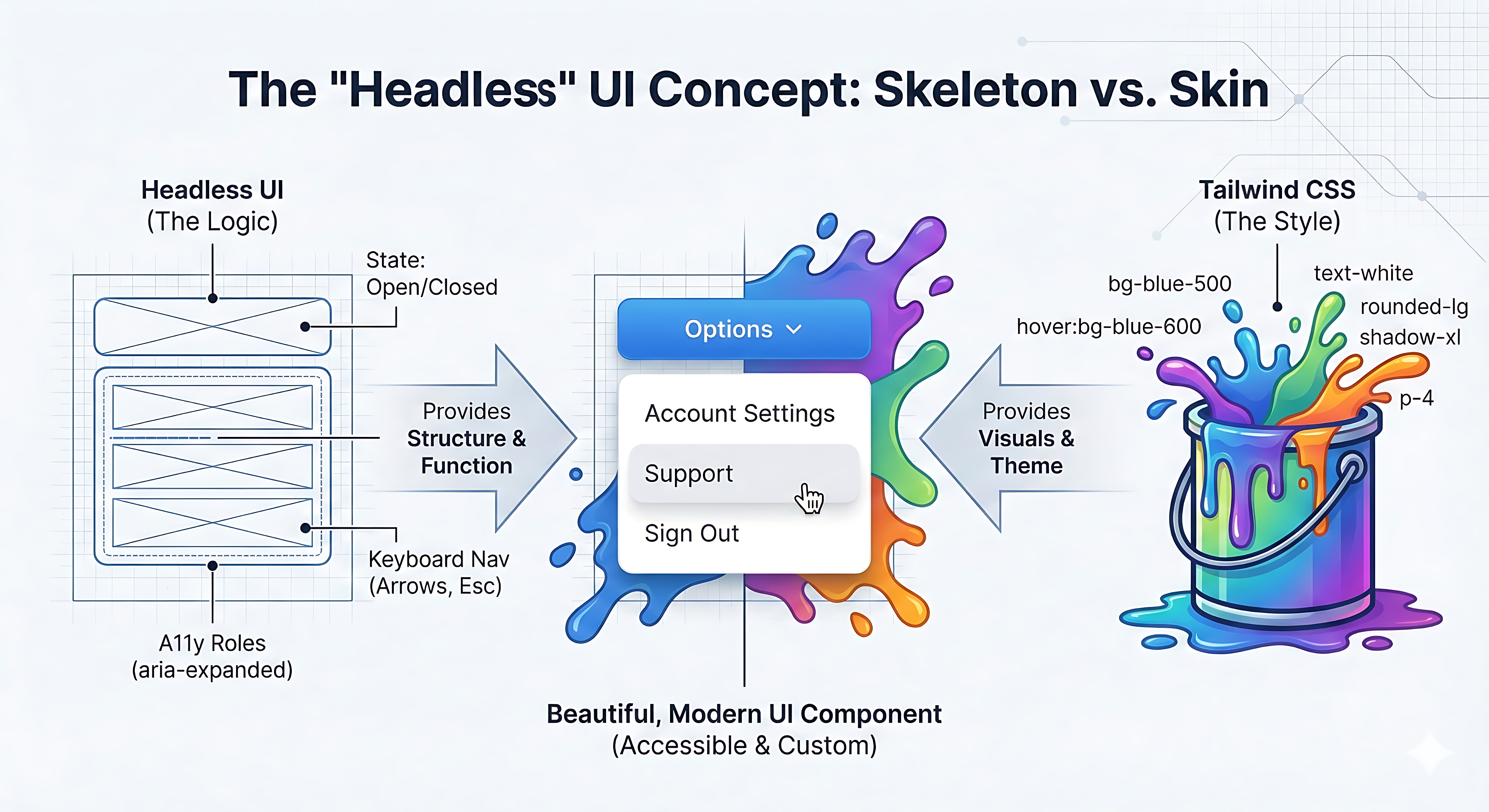
Headless UI is an approach to frontend development where logic and behavior are separated from styling.
- The “brain” handles functionality like open/close states, keyboard navigation, and accessibility.
- The “beauty” is entirely up to you, styled with Tailwind CSS or any design system you choose.
In simple terms, you get fully functional components without any predefined CSS.
The Problem with Traditional UI Libraries
If you’ve built React apps before, you’ve likely faced this choice:
Option 1: Pre-built UI Libraries (Bootstrap, MUI)
- Work out of the box
- Hard to customize
- Apps start to look the same
- Overriding styles becomes messy
Option 2: Build Everything from Scratch
- Full design control
- Accessibility often breaks
- Keyboard navigation is tricky
- Screen reader support is easy to miss
We’ve all been there, either fighting default styles or accidentally shipping components that are unusable for keyboard or screen-reader users.
The Headless UI Advantage
Think of it like a car:
- Traditional UI libraries are like buying a fully built car. It works, but repainting or modifying it is painful.
- Headless UI is like getting just the engine and chassis. It runs perfectly, but you design the exterior yourself.
In technical terms:
- Headless UI provides behavior and accessibility
- Tailwind CSS provides complete visual control
Key Features of Headless UI
No Style Conflicts
Since there are no default styles, you don’t need to override anything. Your Tailwind classes define everything.
Built-in Accessibility (A11y)
Headless UI handles keyboard navigation, focus management, and screen reader announcements automatically.
Lightweight and Performance-Friendly
There are no heavy CSS bundles. You only ship the logic you actually use.
Pros of Using Headless UI with React and Tailwind
Total Design Freedom
No forced Bootstrap or Material look. Your UI matches your Figma designs pixel-perfectly.
Accessibility Is Solved
Complex accessibility patterns are handled for you, saving time and preventing costly mistakes.
Faster, Lighter Applications
Smaller bundle sizes mean faster load times and better performance.
Clean Separation of Concerns
Logic and styling stay separate, making your codebase easier to scale and maintain.
Cons to Consider
Slower Initial Setup
You must style every state yourself, including hover, focus, and active states, which takes more time upfront.
Requires Design Clarity
Without a design system, you may miss the ready-made feel of traditional UI kits.
Learning Curve
Developers need to understand how Headless UI manages logic and how Tailwind handles styling. For junior developers, this can feel more complex than using a simple button component.
Real-World Use Case: Custom Date Picker
At CodeSmiths, we recently built a custom client dashboard for a large business.
The Challenge
The client needed a fully branded date picker. Standard libraries were locked into blue or gray themes, making customization difficult.
The Solution
We used a Headless UI calendar for date logic, including leap years and weekdays, and styled everything with Tailwind CSS to match the client’s purple and gold brand.
The Result
A date picker that worked flawlessly, was fully accessible, and looked completely custom.
Why CodeSmiths Chooses Headless UI
At CodeSmiths, we believe high-quality software must be inclusive.
A product is not complete unless it is robust and reliable, visually intentional, and usable by everyone, including keyboard and screen-reader users.
By using Headless UI with React and Tailwind, we consistently deliver professional-grade logic, pixel-perfect UI, and built-in accessibility.
Final Thoughts
The Headless UI approach is the future of frontend development.
It prevents developers from reinventing complex logic while giving them complete creative freedom. When paired with React’s component model and Tailwind’s utility-first styling, it becomes a powerful combination.
React provides the brain. Tailwind provides the visual layer. Headless UI makes them work together.
Have you tried using a headless UI library yet, or are you still fighting default styles?