
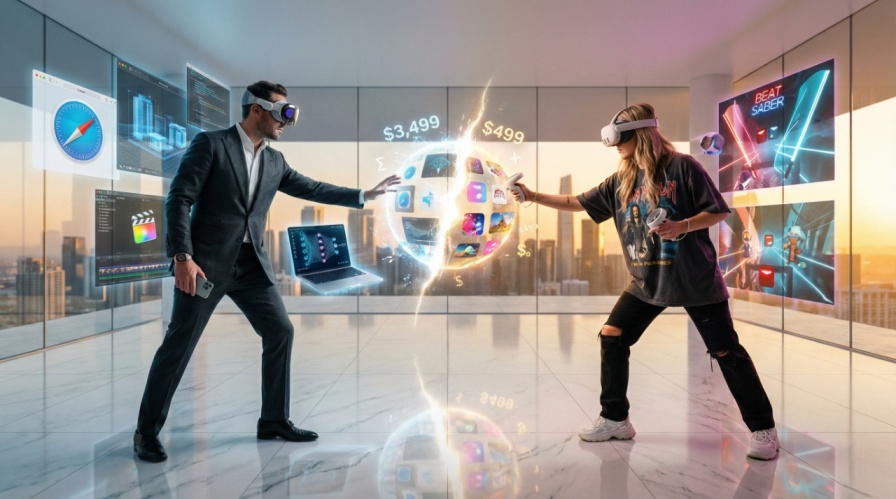
The spatial computing landscape has bifurcated into two distinct philosophies, embodied by devices separated by a staggering $3,000 price gap. The Apple Vision Pro at $3,499 represents a premium “spatial computer” designed to replace physical screens with unmatched visual fidelity. The Meta Quest 3 at $499 champions accessibility, offering a mature ecosystem built for gaming, social interaction, and scalable enterprise training.
This analysis reveals that the choice is not about which device is “better” but which solves your specific problems. For 95% of users, the Quest 3 delivers exceptional value. For the remaining 5%—creative professionals, specialized enterprises, and early adopters deeply embedded in Apple’s ecosystem—the Vision Pro offers capabilities no other headset can match.
1. The Hardware Reality: Where $3,000 Goes
Display Technology: The Defining Difference
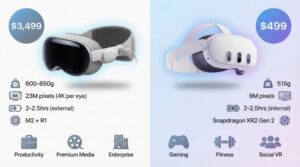
The most significant justification for the Vision Pro’s premium lies in its revolutionary display system. Apple’s dual micro-OLED panels deliver over 23 million pixels total (~3,660 x 3,200 per eye), achieving approximately 34 pixels per degree (PPD)—approaching the 60 PPD threshold of human retinal resolution. Individual pixels are literally invisible to the human eye.
In contrast, the Quest 3’s LCD panels offer 2,064 x 2,208 pixels per eye—approximately 25 PPD. While excellent for gaming and immersive experiences, text appears with visible aliasing, making extended productivity work challenging.
Real-World Impact: The Vision Pro enables users to read 12-point font comfortably for hours, making it viable as a true monitor replacement. One reviewer noted they could read text on their physical iPhone screen while wearing the headset—a feat impossible on competing devices. The Quest 3, while sharp for 3D gaming content, struggles with dense spreadsheets or code editors.
The Vision Pro’s micro-OLED technology also delivers infinite contrast ratios with true blacks, 92% DCI-P3 color gamut coverage for color-critical work, and variable refresh rates (90Hz, 96Hz, 100Hz) optimized for both productivity and cinematic content. The Quest 3’s LCD panels suffer from backlight bleed, creating “grey blacks” that break immersion in dark virtual environments, though its 120Hz maximum refresh rate provides smoother motion for fast-paced gaming.
Processing Power and the R1 Advantage
Apple’s dual-chip architecture—the M2 for applications and the dedicated R1 for sensor processing—creates a fundamental performance divide. The R1 chip processes input from 12 cameras, 5 sensors, and 6 microphones with just 12 milliseconds of photon-to-photon latency. This speed eliminates the vestibulo-ocular reflex mismatch that causes nausea, allowing users to catch a ball or navigate cluttered spaces naturally.
The Quest 3’s Snapdragon XR2 Gen 2 handles both applications and passthrough, achieving approximately 40ms latency—impressive for a mobile chip but perceptibly slower. Fast hand movements create visible warping and geometric distortion as the depth algorithms struggle to maintain coherence.
The Comfort Paradox
Here lies the Vision Pro’s most significant weakness: its premium materials create its greatest flaw. The aluminum frame and laminated glass give the device a luxurious aesthetic but result in 600-650 grams of front-heavy weight concentrated on the user’s face. The external battery pack (353g), while reducing neck strain, introduces the friction of a tethered cable.
Users consistently report facial discomfort and red marks after 45-90 minutes. As one reviewer lamented: “It’s heartbreaking to think how comfortable the Vision Pro could be if Apple had prioritized feel over look.”
The Quest 3, at 515 grams with an integrated battery, achieves better balance for active use. While still front-heavy, its design prioritizes long gaming and fitness sessions over premium aesthetics.
2. User Experience: Natural Inputs vs. Physical Precision
The “Look and Pinch” Revolution
Apple’s controller-free paradigm represents the most intuitive interface ever implemented in a wearable device. High-precision eye tracking turns your gaze into a cursor, while a simple finger pinch acts as a click. Users can navigate the entire system with hands resting comfortably in their lap.
For media consumption and productivity, this system feels “magical.” Browsing websites, arranging windows, or selecting apps requires no learning curve.
The Gaming Problem: This elegance comes at a steep cost for interactive experiences. Without physical controllers and haptic feedback, games feel “empty” and “detached.” The Quest platform’s vast library—from Beat Saber’s rhythm-based intensity to Resident Evil 4 VR’s tactical combat—is built around the physical interaction that controllers provide.
The Quest 3’s Touch Plus controllers offer precision, tactile buttons, and haptic feedback essential for complex gaming and creative tasks. While the Quest 3 supports hand tracking, it lacks the Vision Pro’s eye-tracking assistance, making it a secondary input method.

3. Enterprise Applications: Precision vs. Scale
High-Precision Visualization (Vision Pro Territory)
The Vision Pro has quickly proven its value in industries where visual precision directly impacts ROI:
Porsche Automotive Engineering: Engineers use the “Race Engineer” app to visualize real-time telemetry—speed, braking force, tire temperature—overlaid on 3D car models and live track feeds. The M2 chip handles dense data dashboards that would be unreadable on the Quest 3’s lower resolution. For a racing team where milliseconds cost millions, the $3,500 investment is negligible.
KLM Royal Dutch Airlines: The “Engine Shop” app overlays step-by-step maintenance instructions on true-to-scale 3D engine models. The R1 chip’s spatial stability ensures digital overlays stay precisely locked to physical bolts—critical for safety. If the overlay drifts even a centimeter (common with high-latency passthrough), instructions become dangerous.
Healthcare Surgical Planning: Surgeons use the Vision Pro to review photorealistic 3D anatomical models before procedures. However, a controlled 2025 study in JMIR XR and Spatial Computing revealed significant limitations for real-time precision work. Healthcare professionals performing suturing tasks took 25% longer using the Vision Pro (570 seconds) compared to the Microsoft HoloLens 2 (456 seconds), with significantly higher cognitive load. The video passthrough introduces a subtle disconnect between eyes and hands that hinders real-world dexterity.
Scalable Training (Quest 3 Territory)
Walmart’s Million-Employee Training: Walmart deployed thousands of Quest headsets to train over 1 million associates, simulating Black Friday chaos, customer service scenarios, and safety protocols. The economics are compelling: deploying 10,000 units costs ~$5 million with Quest versus ~$35 million with Vision Pro.
The training benefits from physical controllers that provide haptic confirmation when associates “scan items” or “stock shelves”—building muscle memory impossible with hand tracking alone. Meta’s “Quest for Business” suite provides robust mobile device management (MDM) for remote updates and data wiping across thousands of devices.
Hilton’s Empathy Training: Corporate staff experience the perspective of housekeeping and kitchen staff through immersive VR scenarios. The goal is emotional immersion, not technical precision—making the Quest 3’s lower resolution sufficient while its lighter weight enables easy rotation among conference room participants.

4. The Developer’s Dilemma: Ecosystems and ROI
Building for visionOS
Developing for Vision Pro requires Swift and Apple’s frameworks (SwiftUI, RealityKit, ARKit). Native apps benefit from OS-level features like “Shared Space” and Metal optimization, but the barrier to entry is high. Swift developers command 20-30% premium rates over Unity developers, and the closed ecosystem means code is locked to Apple’s platform.
Unity PolySpatial provides a bridge, translating Unity C# components into RealityKit primitives. However, it comes with significant constraints: no custom HLSL shaders (must use Shader Graph), no real-time global illumination, limited particle systems, and specific lighting nodes. Complex visual effects will fail or require complete reconstruction.
Building for Horizon OS
Quest development leverages Unity or Unreal Engine—standard game development tools with massive talent pools. Meta’s strong OpenXR support means apps built for Quest can port to HTC Vive, Pico, or SteamVR with minor adjustments. Development costs are lower due to asset reusability and abundant documentation.
Strategic Insight: If building for the largest consumer audience or requiring cross-platform deployment, Quest is the clear choice. If targeting premium enterprise clients who value Apple ecosystem integration, the smaller but higher-paying visionOS market offers opportunities.
5. Content Ecosystems: Maturity vs. Potential
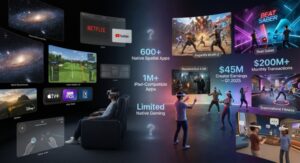
The Vision Pro launched with 600+ native spatial apps and access to over 1 million compatible iOS/iPadOS apps—impressive on paper but revealing in practice. Most compatible apps simply run in 2D windows. Major platforms like Netflix and YouTube were absent at launch (accessible only via Safari browser), representing a significant content gap.
Media Consumption Excellence: For watching movies alone, the Vision Pro is unparalleled. The 4K-per-eye displays create a genuine IMAX-quality experience. Polished apps from Disney+, HBO Max, and Apple TV+ offer immersive 3D content and virtual environments. The PGA TOUR Vision app overlays real-time shot tracking onto 3D course models—showcasing the platform’s potential.
Gaming Desert: The game library remains small, and without included controllers, most titles feel compromised. While some games like Gears & Goo cleverly use hand tracking, the platform lacks blockbuster experiences.
The Quest 3 dominates in content variety and depth. Its mature ecosystem features hundreds of high-quality games (Asgard’s Wrath 2, Beat Saber, Resident Evil 4 VR), dedicated fitness apps (Supernatural, FitXR) with proven cardiovascular benefits, and thriving social platforms. Meta Horizon Worlds reported $45 million in creator earnings in Q1 2025, with total platform transactions exceeding $200 million monthly.
6. Future Outlook (2025-2027)
The market is not static. Both companies have aggressive roadmaps that will influence today’s buying decisions.
Apple’s Trajectory:
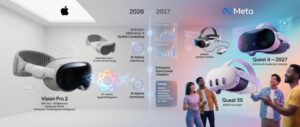
- Vision Pro 2 (Late 2025/2026): Rumors suggest an upgrade to the M5 chip to handle Apple Intelligence (AI) workloads and improved optical systems. The price is expected to remain high (~$3,500).
- Cheaper Model: Reports indicate Apple is exploring a lower-cost headset (removing EyeSight, cheaper materials) to target the $1,500-$2,000 range, but this is likely 2026 or later. This suggests the high price of entry is here to stay for the near future.
Meta’s Trajectory:
- Quest 3S: A budget version (starting at $299) to replace the Quest 2, driving mass adoption and serving as the entry-level drug for spatial computing.
- Quest 4 (2027): Targeted for 2027, focusing on a “large upgrade” in unit economics and gaming performance.
- Ultralight Headsets: Meta is experimenting with “puck” designs (compute unit separated from the headset) to compete with Vision Pro’s form factor but at a lower weight.
Market Trends:
- Spatial Computing SEO: Interest is shifting from “Metaverse” (2022) to “Spatial Computing” (2024/2025) and “AI Integration”.
- Enterprise Dominance: Gartner predicts spatial computing will increase organizational effectiveness significantly by 2028, moving from pilot programs to full-scale operational integration.
7. The Final Verdict: Who Should Buy What
Choose Apple Vision Pro If:
- You’re a creative professional needing portable multi-monitor setups with perfect text clarity
- Your company will pay for specialized visualization tools in automotive, aerospace, or architectural design
- You’re a developer building cutting-edge spatial apps for premium markets
- You’re a media enthusiast who values the absolute best personal theater experience
- You need precise spatial computing for design review, surgical planning, or engineering visualization
Cost Justification: If the device replaces a high-end multi-monitor setup ($3,000-$4,000) or provides competitive advantage in time-sensitive industries, ROI is achievable.
Choose Meta Quest 3 If:
- You want to play VR games with the industry’s most extensive library
- You’re exploring VR for the first time and need an accessible entry point
- You’re deploying at scale for training hundreds or thousands of employees
- You need fitness applications with proven engagement and results
- You value content ecosystem over absolute hardware perfection
- You have normal budget constraints and want exceptional value
Cost Reality: At 1/7th the price, the Quest 3 delivers 80% of the functional value for most use cases.
Wait for Vision Pro 2 If:
- You’re intrigued but price-sensitive (rumors suggest a $2,000 “lite” model for 2026)
- Comfort is paramount (next-gen models may address weight distribution)
- You want mature app ecosystem (developer adoption needs 1-2 years to accelerate)
Conclusion: Two Futures, One Choice
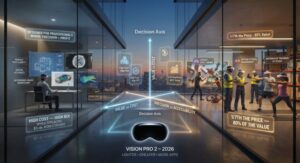
The Vision Pro is a Formula 1 car—expensive, high-maintenance, but capable of performance nothing else can touch in specific conditions. The Quest 3 is a Toyota Camry—reliable, accessible, and capable of serving 95% of users excellently.
Apple has created a “Version 1.0” proof of concept that successfully establishes its vision for spatial computing, even while constrained by current battery and materials technology. It’s a glimpse of a future where physical screens are obsolete, but it demands significant compromises in comfort, cost, and content availability today.
Meta has perfected the mass-market VR experience, offering a vibrant, fun, and compelling world that’s accessible to everyone.
The $3,000 question isn’t which device is better—it’s which solves $3,000 worth of your specific problems. For most people, it doesn’t. But for the professionals, enterprises, and early adopters who need what only the Vision Pro provides, the premium is justified.
The future of computing is spatial. The question is: which path will you take to get there?
- Apple Vision Pro vs Meta Quest 3: Which is Better? – XR Today
https://www.xrtoday.com/mixed-reality/apple-vision-pro-vs-meta-quest-3-which-is-better/
- Apple Vision Pro vs. Meta Quest 3 – Which Offers Better User Experience?
https://vrx.vr-expert.com/apple-vision-pro-vs-meta-quest-3-which-offers-better-user-experience/
- Apple Vision Pro brings a new era of spatial computing to business
- Vision Pro vs Meta Quest 3: Which is Best for XR App Development
https://kodytechnolab.com/blog/vision-pro-vs-meta-quest-3-for-xr-app-development/
- Apple Vision Pro Vs Meta Quest 3: Which Mixed Reality Headset Rules The Way?
https://www.designwhine.com/apple-vision-pro-vs-meta-quest-3/
Know more about relevant topics
The Library of Ash: How AI Read the Invisible: